On-Device OCR
Powered by Google's bundled ML Kit text recognition model. All reading happens locally — your screenshots never leave your phone.
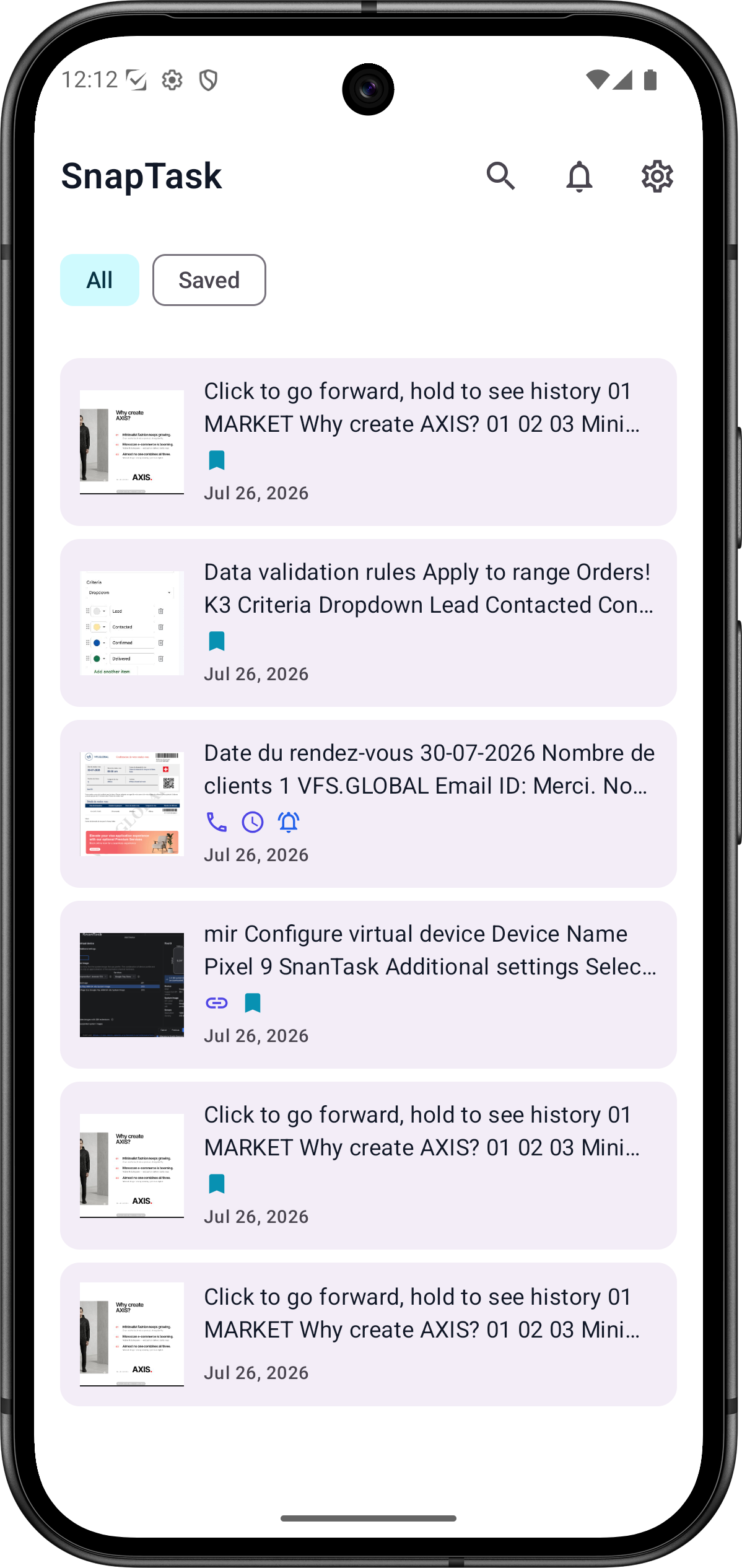
Share any screenshot to SnapTask. It reads the text, detects what matters — dates, phones, links, prices — and instantly suggests the right action. All on your device. No cloud. No account.
SnapTask does one thing exceptionally well — it turns the text in your screenshots into the actions you actually want to take.
Powered by Google's bundled ML Kit text recognition model. All reading happens locally — your screenshots never leave your phone.
Automatically identifies dates, times, phone numbers, emails, URLs, addresses, and prices — from any screenshot content.
Screenshot reading, entity detection, and reminders all work without a signal. The app's OCR pipeline makes no network calls — your screenshots and extracted text are never sent anywhere.
Spotted a date in a screenshot? SnapTask creates a reminder with the right time, title, and context — with one tap.
No account. No analytics or tracking SDKs. Your screenshots, extracted text, and reminders stay on your device.
Open the app and start using it immediately. No sign-up, no login, no email. Just productivity.
No typing. No copying. No switching apps. Just share and go.
Take a screenshot of anything — a conversation, a document, a booking confirmation, a recipe, anything. Then tap Share → SnapTask.
The on-device ML Kit model reads every word in your screenshot in under a second — no internet, no waiting.
SnapTask identifies dates, phone numbers, emails, links, addresses, and prices — and highlights them with confidence scoring.
SnapTask ranks and presents the right action for each detected item. Set a reminder, open a link, call a number, or send an email — instantly.
OCR, entity detection, and reminders run entirely on-device — your screenshots and extracted text are never uploaded to our servers. SnapTask shows a small banner ad, served by Google AdMob, to support development; see the Privacy Policy for details.
Still have questions? Visit the support page or email hello@snaptask.site.
No. SnapTask's OCR pipeline processes your screenshots entirely on-device and never uploads them to our servers. The app does use the internet to display a banner ad through Google AdMob, but that connection is separate from — and never touches — your screenshots, extracted text, or reminders. See the Privacy Policy for details.
No, not for the core features. The ML Kit text recognition model is bundled inside the app, so screenshot reading, entity detection, and reminders all work with no internet connection — on a plane, in a tunnel, or anywhere without signal. The app's banner ad requires a connection to load; if you're offline, the app simply shows no ad and everything else keeps working.
SnapTask uses Google's ML Kit bundled Latin text recognition, which handles printed text, screenshots of apps, and documents very reliably. Results improve on high-contrast, high-resolution screenshots. Detected entities can always be edited before you confirm any action.
Yes. Every screenshot, extracted text entry, and reminder lives locally on your device. You can delete individual items from within the app, or clear everything at once via Android's App Settings → Storage → Clear Data. Uninstalling the app removes all data completely.
In version 1.0, SnapTask automatically detects: dates and times, phone numbers, email addresses, URLs and links, postal addresses, and prices. All detection runs locally using deterministic algorithms — no network calls.
Yes — SnapTask shows a small banner ad, served by Google AdMob, to support development. There are no interstitial, rewarded, native, or app-open ads. Where required by law (such as in the EEA, UK, or applicable US states), SnapTask asks for your consent via Google's User Messaging Platform before requesting a personalized ad. See the Privacy Policy for details.
SnapTask requires Android 8.0 (API 26) or higher. It targets the latest Android SDK for optimal security and compatibility with modern Android features including exact alarm scheduling and predictive back gestures.
No camera, no contacts, no storage, no location. SnapTask requests notification access (to deliver reminders you create), exact alarm scheduling (for precise reminder timing), and boot-completed access (to restore reminders after a reboot). It also declares internet access, used solely by the Google AdMob SDK to display the banner ad — not by OCR, screenshots, or reminders. See the full breakdown on the Support page.
SnapTask is coming to Google Play. No account needed. No cloud. Just productivity — on your terms.